
Paystub Generator: Paycheck
PaystubxFinance
4.0681.00 Reviews
- Version
- 10.0.28
- Installs
- 100.00K
- Age Rating
- Everyone
Screenshots
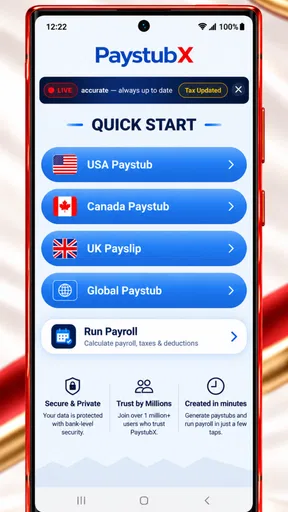
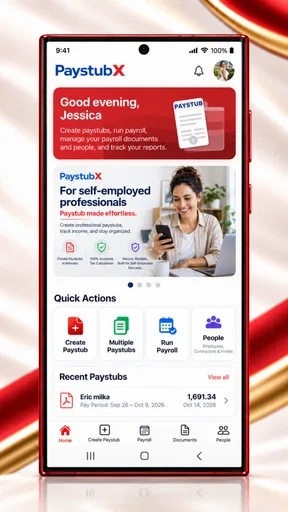
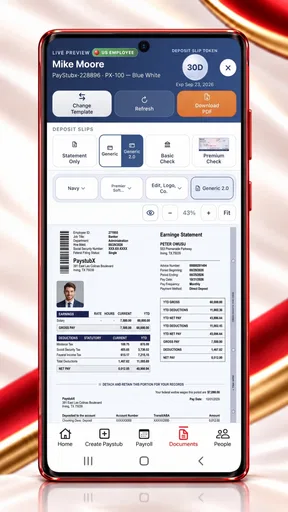
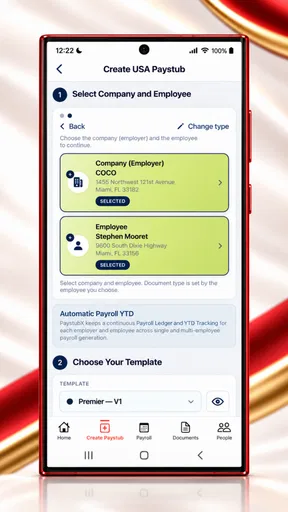
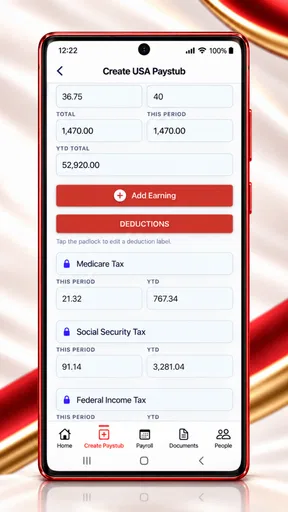
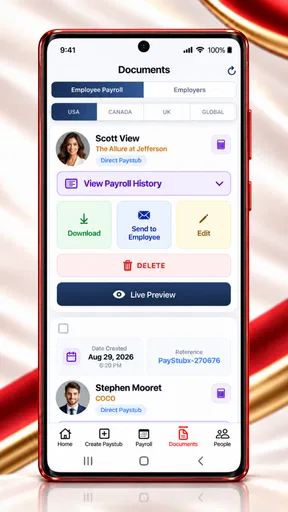
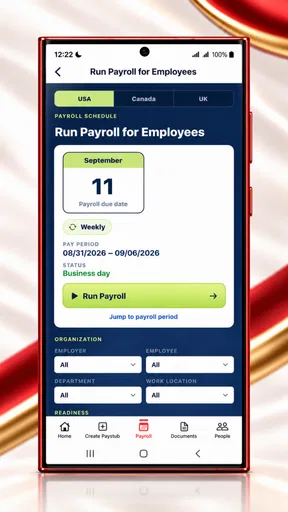
Our Review of Paystub Generator: Paycheck
 Analysis by Appyee
I found Paystub Generator: Paycheck most useful as a practical document-building tool rather than as a complete payroll system. Its purpose is straightforward: it helps you prepare payslips and paycheck stubs while working with payroll tax calculations. That focus makes it appealing when you need a presentable pay document quickly, but it also means I would not treat it as a replacement for professional payroll software, accounting advice, or official employer records.
After spending time with the app, my overall impression is that it is aimed at people who need a simple route from payroll information to a readable paystub. The interface is less intimidating than a full business accounting package, and the free entry point makes it easy to try. Still, the quality of the final result depends heavily on the accuracy of the information entered. The app can organize and calculate details, but it cannot make an incorrect wage, tax setting, or deduction become correct.
What Paystub Generator: Paycheck does well in everyday use
The strongest part of the experience is its narrow purpose. Instead of surrounding the user with invoicing, inventory, banking, or bookkeeping tools, Paystub Generator: Paycheck concentrates on paycheck documentation. I can see the appeal for a small business owner preparing a record for a worker, an independent worker who wants clearer income paperwork, or someone who needs to turn known payroll figures into a more structured payslip.
The app is developed by Paystubx and belongs to the finance category. It has reached over one hundred thousand installs, with an average rating of four out of five from around three thousand ratings. That level of adoption does not prove that it will suit every payroll situation, but it does suggest that the basic workflow addresses a real need for a sizable group of users.
One useful way to approach it is to prepare your figures before opening the app. Have the pay period, gross earnings, deductions, taxes, and employee details ready in a separate note or payroll record. This reduces the chance of rushing through a form and accidentally mixing current-pay information with year-to-date amounts. The app is most effective when it is used as the final organization step, not as the place where you try to reconstruct an entire employment history from memory.
A realistic example would be a small contractor who pays one or two workers and wants to give them a clearer breakdown than a simple bank transfer provides. The contractor can gather the agreed earnings and deductions, use the calculator-oriented workflow to structure the figures, and create a payslip that is easier for the worker to read and retain. That is a sensible use case because the app helps present information that the employer already understands.
It can also be useful for personal record keeping. If I receive irregular income or work across changing pay periods, a consistent paycheck-stub format can make it easier to review what I earned and what was withheld. This is especially helpful when comparing several payments later, because a standard layout is easier to scan than a collection of messages, handwritten notes, and bank entries.
The tax-calculation angle is another reason to consider it. A payroll tax calculator can reduce repetitive arithmetic and help expose the relationship between gross pay, deductions, and take-home pay. That does not remove the need to check the applicable rules, but it can make the numbers easier to inspect. I prefer tools that show the structure of a calculation rather than giving me only one unexplained final amount, and this app’s purpose is aligned with that kind of review.
There is also a practical advantage in keeping the workflow on a phone. If you manage a small operation without a dedicated office setup, a mobile finance app can be more convenient than opening a desktop accounting suite every time you need a basic pay document. The app supports devices running Android five or later, so it remains accessible to people using older compatible phones rather than requiring a recent handset.
Its current version is 10.0.28, which is worth noting for anyone comparing screenshots or instructions found elsewhere. App interfaces can change between releases, so I would rely on what appears in the installed version instead of assuming that an older walkthrough matches every screen. That is a small but important habit with finance tools, where a changed field or calculation option can affect the result.
A better workflow than simply filling in the form
My first tip is to separate three kinds of information before creating a stub: earnings for the current period, deductions for that period, and cumulative year-to-date figures. People often make mistakes by copying a total from one category into another because the labels look similar. A short preparation checklist prevents that problem and makes the finished document more credible.
My second tip is to use the app as a verification aid. After entering the figures, I would calculate the expected net pay independently with a calculator or spreadsheet and compare the result. If the two totals differ, I would stop and inspect the inputs rather than choosing whichever number looks more convenient. This extra minute is particularly important when a document may later be used to explain income to another person.
A third useful habit is to create a naming system for the documents you produce. Include the worker or household member, the pay period, and whether the file is a draft or final copy in your own record-keeping notes. The app can help generate the paystub, but orderly storage is what makes the document useful months later. Without that discipline, even a well-prepared stub can become difficult to locate or compare.
I would also review the completed document from the recipient’s point of view. Are the gross amount, deductions, taxes, and net amount easy to distinguish? Does the pay period match the payment being described? Is any personal information unnecessarily exposed when the document is shared? A finance app can produce a polished-looking result, but readability and privacy still depend on the user’s final check.
Where the app needs caution
The main weakness is that a convenient generator can create a false sense of certainty. Payroll is not only a matter of subtracting a few percentages from gross pay. Tax treatment can depend on location, employment status, benefits, exemptions, deductions, and the period being processed. I would therefore use the calculator to support my work, not to make it the sole authority for a legally sensitive payroll decision.
This limitation matters most when several workers have different circumstances. A simple, repeatable payment may fit the app’s intended use well, while a growing business with multiple jurisdictions, benefits, overtime rules, reimbursements, and formal reporting obligations will probably outgrow it. In that situation, dedicated payroll software or an accountant is the safer choice because the consequences of a small setup error can extend beyond one paystub.
Another point of friction is the difference between a generated document and an official payroll record. A neatly formatted paycheck stub may be useful for communication or personal organization, but a recipient should not assume that every institution will accept it as proof of income. Banks, landlords, government offices, and employers may request documents produced through their own verification processes. I would never create a stub to imitate earnings or use one to support information that cannot be backed up by real records.
The free price makes the app easy to test, but users should pay attention to the commercial model. The app is free to download and use as an entry point, while in-app purchases range from around two dollars to around two hundred dollars per item. That is a wide span, so I would inspect the purchase screen carefully before confirming anything. A free installation does not automatically mean every useful workflow or output is included without charge.
That pricing structure also affects who should choose it. If you only need an occasional personal record and can complete the required process without paying, the app may be economical. If you need frequent documents or advanced business handling, compare the total cost with a payroll service before committing. A low initial barrier can be attractive, but recurring needs deserve a broader cost comparison.
I would be cautious about entering sensitive information until I understood how the installed version handles storage and sharing. Paystubs can contain names, addresses, earnings, and other private details. My practical rule is simple: use a secure device, avoid sending a document through an unprotected channel when a safer option is available, and keep only the records you genuinely need. These are sensible precautions for any finance app, but they are especially relevant here because the output is designed to contain personal payroll information.
Who will get the most from it
I think the best audience is a small employer, sole proprietor, or individual who wants a focused tool for producing readable paycheck documentation without adopting a full accounting platform. It can also suit someone who understands their own payroll figures and mainly needs help arranging them into a consistent format. The app’s Everyone content rating makes it broadly approachable, although the financial responsibility still belongs to the adult managing the information.
It may be a good fit when the number of workers is small, the pay arrangements are uncomplicated, and the user is willing to double-check calculations. In that setting, the app can save time compared with building a new document manually for every pay period. Its value is less about replacing expertise and more about reducing repetitive formatting and arithmetic.
I would recommend looking elsewhere if you need integrated time tracking, employee onboarding, benefits administration, automated filings, bank payments, detailed compliance support, or a shared business payroll workspace. Those needs point toward a dedicated payroll platform. Likewise, anyone who does not understand the difference between gross pay, net pay, deductions, and year-to-date totals should get guidance before relying on a generated document.
Compared with a spreadsheet, this app may feel more direct for creating a single polished paystub, especially for someone who dislikes designing forms. A spreadsheet remains stronger for custom analysis, historical comparisons, and building a tailored audit trail. Compared with a full payroll service, the app is likely to feel lighter and less burdensome for a small task, but the service will generally be the better direction when automation, compliance, and scale matter more than simplicity.
Compared with a blank document template, Paystub Generator: Paycheck has a clearer finance-specific purpose. A template can look professional, but it does not necessarily help with calculations or guide the user through payroll fields. On the other hand, a template may provide more control over wording and branding. The right choice depends on whether the difficult part for you is the math and structure or the visual presentation.
My final view after using it
I see Paystub Generator: Paycheck as a useful middle ground: more focused than a general document editor, but less comprehensive than professional payroll software. Its strongest quality is that it turns a potentially messy paycheck explanation into a more organized task. For a small, straightforward payment, that can be genuinely helpful and save unnecessary effort.
My recommendation comes with one firm condition: treat every result as something to review, not something to accept automatically. Check the pay period, confirm the gross amount, distinguish current deductions from cumulative totals, and compare the final net pay with an independent calculation. Those habits matter more than how polished the document looks.
With that mindset, the free app is worth trying for occasional payslips and basic payroll organization. The four-star average and more than one hundred thousand installs make it a reasonable candidate to investigate, while the paid-item range means I would examine costs before building a regular workflow around it. I would choose it for simple, controlled situations and move to a specialized payroll solution when legal, tax, or operational complexity becomes the main concern.
In short, Paystub Generator: Paycheck is best when you need a focused mobile assistant for preparing paycheck documentation and already know what the numbers should represent. It is not the right tool for outsourcing payroll judgment, compliance, or business administration. Used carefully, it can be a convenient finance utility; used without checking the details, it can make an incorrect record look more convincing than it should.
Verdict
Strengths of Paystub Generator: Paycheck
- Creates professional-looking pay stubs in just a few minutes.
- Useful for freelancers, contractors, and small business owners.
- Supports customizable employee and employer information.
- Calculates common deductions and net pay automatically.
- Lets you save or share completed pay stubs digitally.
Limitations of Paystub Generator: Paycheck
- Accuracy depends on entering correct wages and deduction details.
- May not support every country’s payroll rules or tax requirements.
- Advanced templates or features may require a paid upgrade.
- Generated documents may not replace official employer payroll records.
- Sensitive financial information requires careful handling and secure storage.
Similar Picks in This Category
View All
Google Wallet
Google LLC4.3

Airtel: Recharge, Bank & Loans
Airtel4.0

PayPal - Pay, Send, Save
PayPal Mobile4.2

DANA Indonesia Digital Wallet
PT Espay Debit Indonesia Koe4.5

Binance: Buy Bitcoin & Crypto
Binance Inc.4.8

Cash App
Block, Inc.4.7
Frequently Asked Questions
What is Paystub Generator: Paycheck used for?
Paystub Generator: Paycheck is designed to help users create professional-looking paycheck stubs by entering employment and payment information. It can be useful for freelancers, small-business owners, landlords, contractors, or employees who need an organized income document. Before relying on a generated stub, review every field carefully and confirm that the format meets the requirements of the person or organization requesting it.
Is Paystub Generator: Paycheck free to download and use?
The application may be available to download without an upfront charge, but some features, templates, exports, or document-generation options can require payment. Pricing and subscription terms may vary depending on the platform and the current version of the app. We recommend checking the Google Play Store or Apple App Store listing before creating a document, especially for trial periods, recurring billing, and in-app purchase conditions.
Can I customize the paycheck stubs created with the app?
The app generally allows users to enter or edit details such as employer information, employee data, pay dates, earnings, deductions, taxes, and net pay. Depending on the available tools, you may also be able to choose a template or adjust the presentation before saving or sharing the document. Always compare the final result with your real payroll records to avoid incorrect information.
Are paycheck stubs created with this app legally valid?
A paycheck stub generated by an app is not automatically an official payroll record or proof of income. Its acceptability depends on the accuracy of the information, the purpose of the document, and the requirements of the recipient, such as a landlord, lender, employer, or government agency. Never use the app to fabricate income or alter financial details, and ask the requesting organization what documentation it accepts.
Is my financial and personal information safe in Paystub Generator: Paycheck?
Because the app may handle sensitive details such as names, addresses, employer data, wages, taxes, and banking-related information, privacy should be considered before use. Review the app’s privacy policy, permissions, data-storage practices, and sharing options in the store listing. Avoid entering unnecessary information, use a secure device, and do not share generated documents publicly or through untrusted services.
